



Candidate assessment tools eliminate guesswork for faster hires and better outcomes. Find the perfect tech with this list of candidate assessment software.
Subscribe to our Newsletter
Like what you're reading? Leave us your email, and we'll deliver to your inbox on the last Thursday of the month.
Picking the best candidate assessment tool from a busy market is tough, right?
Faced with plenty of promises and promotional content, you need to know what you’re getting for your investment and—more importantly—that it’ll let you achieve your hiring goals.
In this article, you’ll learn about 16 candidate assessment tools to improve hiring processes and reduce attrition. By focusing on each one’s most notable features, this list will help hiring teams make the best decision about which candidate assessment tool to use.
What is a Candidate Assessment Tool (and Why Get One)?
A candidate assessment tool is software designed to evaluate job applicants based on various criteria, such as soft skills, hard skills, personality traits, and cultural fit.
These tools streamline hiring processes by automating pre-employment checks, typically with online skills tests, personality tests, and situational judgment assessments.
They help hiring managers make more informed decisions about which applicants to interview and ultimately hire.
The key outcomes are:
- Reduced time-to-hire for large workforces
- Standardized, fair evaluation processes
- A stronger team packed with high-quality talent
All candidate assessment tools have their own capabilities and credentials. The right one for any business depends on its objectives.
For example, if a company hires for a wide range of roles in a niche industry, tools with lots of tweakable assessment templates will work best. If a company hires in high volumes for a few specialized roles, tools with customizable assessment scoring and pass thresholds work best. Out-of-the-box self-serve software could be more suitable for a hiring manager at a small business.
Here's a run-down of tools to help you understand the landscape and make an informed decision.
A word on pricing: Recruitment assessment tools are advanced pieces of software. Rather than publish rigid pricing structures, most providers—including HiringBranch—tailor their plans to companies’ precise needs. Contact their experts to discuss your challenges and get accurate quotes.
HiringBranch
HiringBranch is a conversational communication and soft skills hiring assessment, offering proven advantages over traditional multiple-choice and standardized language tests.

Rather than relying on rigid templates, HiringBranch uses conversational AI with assessment content tailored to specific roles and industries. Using open-ended questions, the AI evaluates not just what candidates say, but how they say it.
The result?
Hiring teams get a clearer, 99% accurate view of which applicants have the specific skills required to perform well on the job, before speaking with them. It streamlines the interview process while unlocking far stronger, unbiased, data-driven hiring decisions.
User-friendly for employers and candidates, HiringBranch has replaced millions of manual assessments and psychometric tests for high-volume hiring teams in telecommunications, retail, health, banking and insurance, IT, and more.

Here’s how the talent team at IT services and consulting firm Infosys described their experience of using HiringBranch:
"HiringBranch has made hiring easier and faster by screening a huge number of candidates automatically. HR used to sit in 15-20 minute interviews consuming a huge amount of time. That time is cut by 80% now."
HiringBranch’s stand-out features:
- Better hiring performance guaranteed
- The People Skills Framework helps you assess your current workforce and future requirements
- AI open-ended ‘job preview’ question format that is 4X more reliable than multiple choice
- Full-service team to tailor AI algorithms and assessment content—and analyse the resulting data
- Baked-in CEFR language scoring equivalency
- Skill-gap analysis and training for data-driven team development
Speak to a HiringBranch expert to explore risk-free pilot options and discuss your hiring challenges.
Codility
Codility provides coding skills evaluations for technical hiring and upskilling.
The tool offers a library of coding tests spanning data structures, algorithms, SQL, and more. Candidates code in a realistic integrated development environment (IDE) to demonstrate their technical skills.

Codility also evaluates candidates’ soft skills like problem-solving aptitude and teamwork through collaborative coding exercises (a feature called CodeLive) and timed hackathons.
Codility’s notable features:
- An automated anti-plagiarism system ensures test integrity and reliability
- Skill mapping to identify the best candidates and spot skill gaps in internal teams
- Candidate accessibility features such as screen readers and support triggers
eSkill
eSkill offers customizable job-based skills tests for hiring, training, and employee development.
Its ability assessments cover subjects like aptitude, programming, Microsoft Office, and language proficiency.

There are also job-specific tests for various roles across many industries, from education and hospitality to finance, accounting, and business management. Like TestGorilla, eSkill features in G2’s list of candidate assessment tools suited to small businesses.
eSkill's notable features:
- A skills taxonomy covering more than 800 skills and job roles
- Simulated tasks that replicate real workplace scenarios
- Video questions for increasing engagement and verifying ID documents
SkillRobo
SkillRobo simplifies candidate screening with automated interviews.
It mainly targets smaller-scale employers looking to fill technical roles, with a skill library geared toward programming (tests for CSS, Java, Python, etc.) and an IDE for testing candidates’ abilities.

You’ll also find broader assessments for areas like business etiquette, logical reasoning, project management, and marketing.
Whatever you’re testing, SkillRobo uses AI to auto-evaluate submissions for correctness and efficiency.
SkillRobo's notable features:
- Assessment questions created by subject matter experts
- Customizable tests with the ability to adjust difficulty levels
- In-depth reports for analyzing both candidates and test effectiveness
Mettl
Mettl is an end-to-end talent assessment platform for hiring, upskilling, and certification.
The Mercer-owned tool combines standard assessments for aptitude, language, personality, and domain skills with a secure exam management system to measure progress.

Mettl supports online proctored exams with security features like live monitoring, browser lockdown, and audio-video recording.
Mettl's notable features:
- Over 150,000 pre-written multiple-choice questions to assess skills (in lieu of open-ended questions)
- Multi-language support for global hiring
- Specializes in graduate, technical, and sales hiring
Adaface
Adaface simplifies pre-employment assessments with 35-40 minute scenario-based skill tests.

Its test library suits those hiring for technical roles using programming, data science, and IT assessments.
You’ll also find personality assessments and broader skills tests in areas like computer literacy, language proficiency, and critical thinking.
Adaface's notable features:
- Eliminates cheating with “non-Googleable” questions, copy-paste protection, and webcam proctoring
- Interactive scorecards for assessing candidate suitability
- A mix of ready-to-use tests and customizable templates
Applied
Applied is an all-in-one recruitment tool that uses anonymized applications and predictive assessments to help users recruit fairly and inclusively.

Promoted as an “ethical recruitment solution,” it promises to diversify your candidate pool and find top talent for your business.
Like others in this list, Applied uses simulations of real-world scenarios to assess candidates’ abilities. There’s also support for creating unbiased job ads, shortlisting candidates, and conducting fair interviews.
Applied's notable features:
- A central dashboard to see all your assessment data in one place
- Automated interview scheduling and rejection emails
- Hiring team calibration checker to spot discrepancies in reviewing techniques
Harver
Harver combines interactive job previews with predictive analytics for comprehensive candidate evaluation.
It offers tests for assessing character traits, cognitive abilities, and job knowledge, as well as gamified behavioural tests and a work-from-home assessment.

Harver’s home-working assessments check that potential and current employees’ home computers and connection speeds are up to required standards—ideal for remote workforces.
Beyond assessments, Harver supports hiring teams with interviewing, reference checking, and general hiring process optimization.
Harver's notable features:
- Gamified assessments with a 98% completion rate
- Personalized job preview videos to showcase your employer brand
- A choice of assessment lengths to suit your hiring needs (e.g., short behavioural assessments for hourly roles vs. more detailed tests for professional talent)
SHL
SHL is an established name in talent evaluation. Its broad portfolio of personality assessments, skills tests, and role simulations lets users in various sectors gauge candidates’ suitability across the hiring process.

SHL has devised a “Talent Acquisition framework” to help users hit both short- and long-term hiring goals. This involves measuring candidate suitability on readiness, fit, and potential.
SHL's notable features:
- Tests available in more than 40 languages
- Ready-made integrations for over 80 applicant tracking systems
- Known for multiple-choice CEFR language proficiency testing (in lieu of open-ended questions testing for fluency and language proficiency)
Talview
Talview is a talent assessment tool with a vast library of unique and customizable tests. It’s included in Capterra’s list of “best pre-employment testing software for small businesses.”
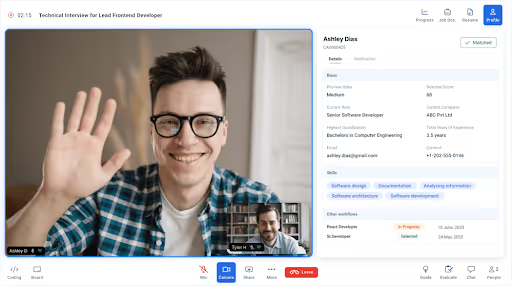
The tool has five assessment categories to cover a range of roles. These are domain and skill-based, coding, cognitive and aptitude, communication and language, and behavioural.
Talview also caters to users on the move with candidate- and recruiter-specific mobile apps for Android and iOS.
Talview's notable features:
- An extensive assessment library covering hundreds of role-specific skills
- Integrations for collaboration, video conferencing, and customer relationship management (CRM) tools
- Security and compliance measures to protect employer and candidate data
ThriveMap
ThriveMap helps reduce attrition using digital “day-in-the-life” skills-based candidate assessments.

Its task and scenario simulations give applicants on-the-job experience so they know what to expect should they be successful. All while gathering competency insights to support your hiring decisions.
The software’s applicant tracking system (ATS) integrations ensure it’ll slot into your existing recruitment workflows, minimizing disruption.
ThriveMap’s notable features:
- “Real-world” job scenario simulations
- Tailored assessments to measure talent against ideal candidate profiles
- ATS integration for syncing data to a hiring team’s analytics dashboard
iMocha
iMocha applies various methods to assess and track candidates’ competencies, personalities, and communication skills (including reading, writing, and speaking).

The tool has a granular skills taxonomy covering multiple industries (i.e., a structured classification system of skills relevant to various job roles). There are also over 1,500 skill-mapped job profiles and 2,500+ pre-built hard and soft skills assessments.
Any tool that takes a “skills-first” approach like this is useful, given that top-skilled candidates are proven to become top performers.
iMocha’s notable features:
- Multi-channel validation that includes social and internal system data, user input, and technical assessments
- Skill-gap analysis to inform up-skilling and re-skilling programs
- A skills inventory to help you understand your current workforce and anticipate future requirements
- Skills benchmarking to identify strengths and weaknesses in your business
Pymetrics
Pymetrics uses soft skills assessment games to collect behavioural insights on your candidates and employees.

It has 12 core games for assessing users in areas such as effort, risk tolerance, decision making, and emotion—as well as a further four to measure numerical agility and quantitative reasoning.
There’s also an integrated digital interview platform for evaluating qualified candidates in more detail without switching interfaces.
Pymetrics’ notable features:
- Assessment algorithms are routinely tested for unconscious bias to support ethical hiring
- The ability to evaluate candidates for any role in your company (not just the jobs they apply for)
- Connectivity to HR and recruitment software, including Oracle, Workable, and SAP SuccessFactors
TestGorilla
TestGorilla lets you build custom tests or choose from a library built for various roles and professional tasks. G2 lists it as one of its top solutions for small businesses.

You can invite candidates via email using a unique link or through your existing ATS. They don’t need an account to take part, so they can contribute to hiring insights immediately.
Once the data’s in, you’ll see your candidates ranked when you click on an assessment. And you can explore more in-depth reports on each individual.
TestGorilla’s notable features:
- Ready-made technical and non-technical tests on data analytics, coding, company culture, and more
- Cheating prevention measures include alerts when candidates exit full-screen mode and automated snapshots during testing
- The ability to customize tests to match brand colours
Vervoe
Vervoe is an AI-powered skills-testing platform that uses job simulations to let candidates show you how they’d perform in a role before they’re hired.

The software, which has various features catering to startups, places users in virtual work environments to solve real-world tasks and role-specific challenges. Users can then compare applicant performance to determine which are a good fit.
There’s also a library of skills assessment templates, all of which can be tweaked to suit specific hiring needs.
Vervoe’s notable features:
- Branded assessments let you add your logo and brand colours
- Integrations for HR and broader business tech, including ATS, SMS and email tools
- Application programming interface (API) access for developers to create bespoke integrations
Versant
Focusing on language only, Versant creates an assessment that measures English proficiency.

Versant (by Pearson) scores candidate language skills automatically using AI minutes after they complete the assessment. Hiring teams are provided with a communication scorecard for each candidate. On their website, Pearson Versant says their assessment can be catered to small or large teams and is affordable.
Versant’s notable features are:
- Language scores align with the Global Scale of English (GSE) and the Common European Framework of Reference (CEFR)
- Suggestions on how candidates can improve with results that can be distributed
- Control on passing scores, and the amount of data that is captured on each candidate
Ways to Optimize Candidate Assessment Software ROI
1. Define Clear Objectives
When a hiring team is clear on what it wants to achieve by implementing candidate evaluation software, it can confidently choose a tool with useful features and capabilities.
Employers can also use objectives to measure their implementation’s success. For example, if the primary goal is to speed up recruitment, the team can track a metric like time-to-hire after onboarding.
Other common hiring objectives include increasing workforce diversity, standardizing skill proficiency, and raising the quality of hire.
2. Monitor Candidates to Prevent Cheating
Anti-cheating measures like keystroke analysis, video recordings, and plagiarism detection deter and uncover dishonest behaviour to make assessments more reliable.
That invariably leads to better-informed hiring decisions.
HiringBranch monitors candidates through video face detection to prevent cheating, allowing users to hire on merit.
3. Work Smarter with Artificial Intelligence (but Stay Vigilant)
AI algorithms can analyze large volumes of candidate data quickly and accurately, providing valuable insights into candidates’ skills, likely job performance, and suitability. That means employee assessment tools with genuine AI capabilities let users work more efficiently while eliminating human error at various stages of the hiring process. Using AI can lead to near-perfect selection accuracy, reducing bad hire rates and time-to-hire. No wonder Workable found that almost two-thirds of HR professionals used AI for hiring in 2023.
Just be wary of false AI promises. Some tools that claim to be “AI-generated” or “AI-infused” often only use automation. Others, like HiringBranch, leverage AI in natural language processing, speech, skills recognition, and more to evaluate candidates’ responses to questions or instructions.
It’s also vital to understand where a tool’s AI training data comes from, and whether it could be biased. Another tip is to check if you’re required to train the AI yourself or if the vendor does it for you.
To avoid AI 'marketing' traps, ask vendors for AI validity documentation. Or even better—because what layman can read AI documentation?—ask for an AI third-party auditor report that validates governance and biases for you.
4. Integrate with Other Tools
Integrating candidate assessment software with other HR and business tools lets users synchronize data across different stages of the recruitment process. This is done using systems like an ATS and human resource information system (HRIS). Users can then enhance candidate and team member profiles with assessment results or better still, skills level data.
Depending on its chosen software, the hiring team may also be able to integrate project management apps, email clients, and video interviewing tools.
5. Gather Feedback from Team Members and Candidates
Collecting feedback from internal stakeholders lets recruiters assess the usability and effectiveness of their candidate assessment software.
By exploring stakeholders’ experiences and pain points, employers can find opportunities for improvement and ensure everyone is using the tool effectively.
Getting input from candidates who’ve gone through the assessment process is helpful too. Addressing any issues they raise helps hiring teams maximize engagement for future users.
Dig even deeper by testing tools side-by-side. Put yourself in the candidates’ shoes, take an example test and see what you prefer. If a multiple-choice format hinders your experience, it’ll likely affect applicants in the same way.
Final Thoughts
Adding a skills test to the hiring process filters out poor-fit hires to save companies time and strengthen their workforces faster.
The right candidate assessment tool will make that evaluation process a breeze so recruiters can focus on more important tasks, like sourcing and interviewing a talent pool’s top candidates before the competition has a chance.
Many tools offer more than just assessments and some businesses will find extra features helpful. But don’t let bells and whistles distract you from your hiring goals. For example, customizable tests are only useful if you have the time and talent to craft quality, unbiased questions. And AI is only valuable if it tangibly improves the evaluation process.
Ultimately, hyper-focused, specialized tools built for your type of recruitment will inevitably deliver better outcomes—now it’s time to put some to the test.
Image Credits
Feature Image: Unsplash/Firmbee
Image 1: Via HiringBranch
Image 2: Via Codility
Image 3: Via eSkill
Image 4: Via SkillRobo
Image 5: Via Mettl
Image 6: Via Adaface
Image 7: Via Applied
Image 8: Via Harver
Image 9: Via SHL
Image 10: Via TalView
Image 11: Via ThriveMap
Image 12: Via iMocha
Image 13: Via Pymetrics
Image 14: Via TestGorilla
Image 15: Via Vervoe
Image 16: Via Versant


.avif)


.svg)